Showing posts with label Internet Speed. Show all posts

Sunday, August 16, 2009

Google Preview (GP) | Solution for Relevant Search with Thumbnail


Considering you are using Search Engines like Google, Yahoo, AltVista, and Bing etc daily, as search engines are de facto today. If you are searching any topic or any website, sometimes search engine indexes some irrelevant sites (or made for SEO). This wastes your valuable time and internet bandwidth.
The solution is Google Preview (GP). Google Preview (GP) is available as an add on for Firefox and Internet Explorer both. After the installation whenever you perform a search in any search engine (Google search, Yahoo Search etc.) Google Preview will show the preview of the web-pages adjacent to the link. It also shows the page rank under the link of the search results. With GP you can prevent to visit the unrelevent, fake and phishing site. The rank of the site search is very useful to visit only to the popular and reputed sites.
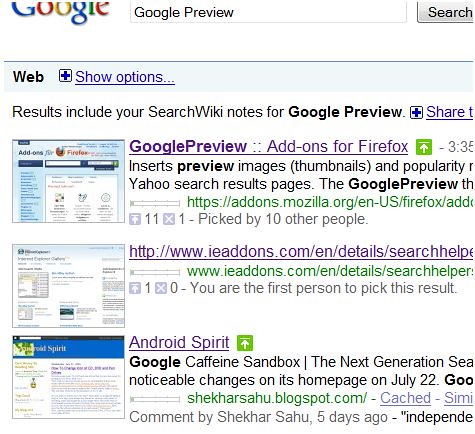
Firefox users download Google Preview from here
And Internet Explorer download it from here.

Also Google launched a new service called Google Voice.
Visit Google's official blog http://googleblog.blogspot.com
Shekhar Sahu
White Hat Android

Monday, July 13, 2009

Increase Your Internet Speed for Sure !

Windows uses the 20% of your internet bandwidth. If you’re using Microsoft Windows OS genuinely or ..., you are a part of Microsoft development through error reports and all.

Do you want to use 100% bandwidth of your internet connection? If yes !

Follow these steps:

  • Right click on taskbar then select Task Manager to open “Task Manager”. Then click on file menu then select “New Task (Run)”.
  • Type "gpedit.msc" with no quotes. This opens the “Group Policy Editor” and goes to: "Local Computer Policy" Go to "Computer Configuration" then "Administrative Templates" then select "Network" then "QoS Packet Scheduler" After that, select "Limit Reservable Bandwidth".
  • Open Limit Reservable bandwidth, It is “Not Configured” by default. To know the cheat click on Explain tab.
  • Not Configured means: The Packet Scheduler limits the system to 20 percent of the bandwidth of a connection."
  • Now, you have to do is to ENABLE Reservable bandwidth, and then set it to ZERO. This sets the system to reserve nothing instead of the default 20.
Now fly with your 100% efficient internet!          Click Here  for More Tips n Tricks

Get the PDF version

Member